ga('require', 'GTM-TWVPBWV'); Let's talk SEO

Thursday, 21 November 2013

Go to different places with Place Pins on Pinterest

I am fan of Pinterest and I just love this website a lot. The DIY and How to are my favorite sections. Pinterest is a simple concept social media site. It has introduce one more beautiful thing "place pin". As soon as you'll login, it'll show you a screen something like:
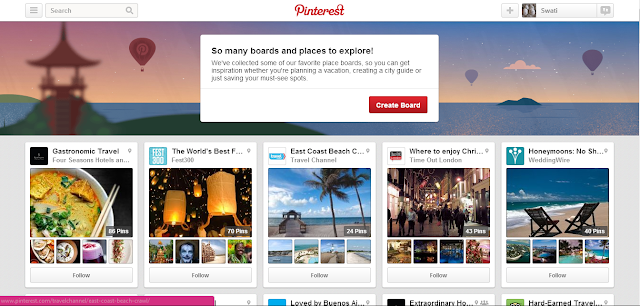
I've created a board and pinned some places in it. The fun part is that the destinations are pinned on a map. To add places, add city, the place you want to visit in that city, upload a photo or pin from the suggestions, provide a description and you are done with the pinning.
Visit board https://www.pinterest.com/swati28/places-i-would-love-to-go/ . I've pinned 4 places for trial purpose.
This update will be helpful for trip-planning websites. The owners of pinterest are launching Android and iOS app too, to make it easier for users to add places to their boards. The map provided along with pinned places would help in guiding to reach that place. You can add restaurants, bus stands, airports and many things to the board, or follow someone else's to guide yourself to that place.
Tripadvisor is providing database to Pinterest; Foursquare, Stamen, MapBox are providing maps to make the pin-board interesting.
USERS: Go ahead, pin and plan your destination.
TRAVELLING WEBSITE OWNERS: optimize the board perfectly to not to miss this "Place Pin"

Wednesday, 20 November 2013

Bing webmaster introduces "connected pages" in Dashboard

This is interesting, Bing webmaster has added a new and exciting feature called as "connected pages". This tool allows you to connect following pages that are linked to website:

  • Twitter
  • Facebook
  • LinkedIn
  • Google Plus
  • Windows App
  • Android App
  • iOS App
  • Pinterest
  • Windowsphone
  • Youtube
  • Instagram
  • Myspace
The "connected pages" tool is accessible in Dashboard--->Configure My Site--->Connected Pages.
The pages that are to be connected should have link of the website in them, else those will not be verified.
The data will be shown after 72 hours. This tool will help in letting know what social media platform is working best for the website. It would become easier to make strategies accordingly. I've added mine and waiting to see the results in webmaster tools.
Will share the stats here too.

Wednesday, 6 November 2013

Free rank checking tool

If your website is targeted in various countries, you need to know the ranks of various keywords. There are many tools that can ease this work. I've been working with few such tools and will share here.
I would appreciate if reader's could add more tools to this list.


  1. Rank checker by SEO Book : This was the tools that I used. It can check ranks for Google.com domain for free version and more international domain for paid version. You can check ranks of single to multiple keywords. Whole process is defined in the videos. This is an add-on (i use it on firefox) and it is quite good with the accuracy of ranks. 
  2. Rank tracker: This is a power-pack tool which can not only be use for checking ranks but also for checking back-links of website. The free version is accurate but if you are using it with country specific IP then accuracy increases more. Free version wouldn't allow to save reports-not a problem, take the snapshots. The paid version is amazing and works perfect. One more thing that you may require is captcha filling tool, or better is to fill captcha on your own.
  3. Hows this look in: I encountered this tool recently and found it good for manual checking of keywords. This is limited to 8 countries (US, UK, Russia, Netherlands and others). The team is working to add more TLDs. You have to register before using this tool.
    The fields that you need to fill are URL-fill in google.com or .co.uk as per your convenience, Location- The TLD set in URL and Browser form the drop down menu. After these fields are filled you'll be provided with virtual Google of that area to check the ranks manually. 
  4. Google adword preview tool  This is a very good tool with one limitation, that you have to check ranks manually. Set domain, language, location and device and check the ranks.
Points to note
  • Tools #1 and #2 are good for checking ranks of too many keywords.
  • Tool #3 and #4 are good for checking ranks manually.
  • Tool #1 and #2 may give wrong ranks if using free. 
  • Tool #3 and #4 are accurate with ranks but are tedious tools if the number of keywords are high.

Thursday, 31 October 2013

Create custom Google plus URL for Google page or profile

This may be an old news for few but I came to know about it today so thought to share it here.
Like Facebook provided feature of having custom URL for Facebook profile and Facebook fan page, one can have custom Google plus URL too.
I created my custom URL like https://plus.google.com/u/0/+SwatiTripathi/ 
Some easy steps to be followed:

  1. Open up http://gplus.to/.
  2. Fill in two fields, the nick name that you wish in your Google plus profile and the Google plus numeric ID. Customized Google URL
  3. As soon as you are done, Google plus will ask you to confirm the customized name that you've requested for. 
  4. The verification will be done after you provide a phone number.
  5. A verification code is will sent on the phone number and the URL will be confirmed.
Few things that are to be taken care of are:
  1. There should be a profile picture.
  2. There must be 10 followers.
  3. The account should be 30 days old.
Some similar steps can be done for customizing Google plus page too. Be quick as Google may charge for custom URLs in future.

Advantages:
  • No need to remember those long URLs for pages.
  • While typing google.com/+something , Google will auto suggest the things.
  • Branding is more easy.

Wednesday, 23 October 2013

Why you need a canonical tag?

"Duplicity" is the scariest word for website owners.

Duplicity can be of two types:

  1. Internal duplicity: When the content within the website is duplicate or there are multiple versions of URLs existing (specially in case of e-commerce websites) 
  2. Let's call it external duplicity: When you are lazy to write more and accidentally writes the website's content onto some other websites (like, company profile in linkedIn) or someone was lazy and copied your website's content onto his.
It was duplicate content which made Google to conceive Panda update. Panda target websites with poor, low quality content or duplicate content.

By now, many of you must have found a tool to check duplicate content, but for those who are searching, copyscape.com is the fantastic tool to check the duplicate content. Copyscape, shows the various websites having similar content as that of your website. 

While copyscape helps is tracing external content, how can you trace internal duplicity? Well, webmaster tools are the solution. Webmaster will not show you the duplicate content, it will show the duplicate meta tags (meta title and meta description). These details are available in "HTML Improvements" section. 

Now that you have tracked the internal duplicate content, what is the next step? Check why these pages are duplicate. You may notice there are pages where you tend to have same content over different pages. Such issues are faced by e-commerce websites. 

Let us understand with an example, say you sell shirts online, you decide to show 10 shirts on one page and make such 8 pages. For SEO purpose you add a small content in the end of the page. Now when crawlers crawl the website, they'll notice that the URL is changing from, http://myshirtsexample/shirts/page1 to http://myshirtsexample/shirts/page2 and so on up to 8 pages, but the content is same on all of the 8 pages, it raises the trigger, considering the content as duplicate. But in actual, the content is not duplicate and it is practically impossible to write content of 8 pages (or more pages). 

Let us take one more example, which is a general problem in every website. At times, the home page tends to have many versions of URL. www.mywebsite.com , www.mywebsite.com/index.html, mywebsite.com etc. In such cases too, crawlers will treat each version as different websites containing same content.

Now with the two examples above you have managed to track types of duplicity that are possible. Some are easily removed and for some other is the "canonical tag".

With help of canonical tag, you can notify Google that the content on these pages are not duplicate. The canonical tag looks like,

 <link rel="canonical" href="www.mywebsite.com" />
Let's understand, I'll put this tag in the head section of, www.mywebsite.com/index.html and mywebsite.com. This notifies Google that my original website is "www.mywebsite.com". 

For the shirts example, the canonical tag that Google has suggested is rel=”next” and rel=”prev”. Now about using it.
On the webpage http://myshirtsexample/shirts/page1, add the following canonical tag:
<link rel="next" href="http://myshirtsexample/shirts/page2" />
On second webpage http://myshirtsexample/shirts/page2, add following canonical tag:
 <link rel="prev" href="http://myshirtsexample/shirts/page1" />
<link rel="next" href="http://myshirtsexample/shirts/page3" />


Now there's may be a chance when you are changing the domain and some how 301 redirect is not possible, for such cases, Google supports, cross-domain rel="canonical" link element. Choose wisely.

Note:  
  1. While Google can understand numbers of canonical tags on single website, Bing usually advice not to use too many canonical tags.
  2. Choose canonical link wisely, the link that is put along it is the main link.
  3. While using next, prev canonical use, next tag on first page, prev on last page and next and prev together on second-to-second last page.
  4. Before using cross-domain canonical tag, try 301 redirects but if somehow it is not at all possible then go for cross domain canonical tag.

Tuesday, 22 October 2013

Now run Video ads on Facebook

With so many updates and hits, Google is disappointing marketers and making them work hard to get desired SERP; while Facebook is luring marketers with new ways to market with them.

Facebook developer

Facebook has officially announced that:
  1. Mobile apps can now have video ads. 
  2. Pay for actions only
Video ads as per Facebook will increase the chances of more downloads of apps. Facebook suggested this as users can get a brief intro of the app that they are about to install on their phones. Great thought Facebook.
Earlier, the advertisers bid for their ads on basis of CPC (cost per click) or oCPM (optimized cost per impression). Facebook has introduced a new concept for advertisers, which they named as CPA (cost per action). According to CPA, the advertiser has to pay only for the number of downloads. To know more about CPA click here.

If you are running an app and want to try for these two new features proceed here

Original press release by Facebook: https://developers.facebook.com/blog/post/2013/10/21/get-efficient-installs-with-video-creative-and-cpa-buying-for-mobile-app-ads/

Friday, 18 October 2013

Types of sitemap and their importance

The SEO people must be knowing what sitemap is and how they are important. The two most important sitemap are, one, the .xml sitemap and the other sitemap for users. The other sitemaps are image sitemap, video sitemap and mobile sitemap.
Sitemap is basically a file that has all the links of the website (that you want search engines to crawl). Since all links are at one place it becomes easier for search engines to crawl every link that it might miss because of lack of internal linking in website.

Let's know bit more about them:

  1. Sitemap: A usual sitemap is provided to users to help them to ease their navigation on the website. A sitemap should clearly define the links, the sub-parts of those links(if any). The best example of sitemap that I could find is http://www.apple.com/sitemap/ . Do visit and check the navigation.
  2. XML Sitemap: XML sitemap is an .xml file that contains all the links of the website and this sitemap is submitted on Google and Bing webmaster. This sitemap eases the work of search engines.
    The code looks like
    <?xml version='1.0' encoding='UTF-8'?>
    <urlset xmlns="http://www.sitemaps.org/schemas/sitemap/0.9">
    <url>
            <loc>http://myexample.com/</loc>
            <lastmod>2013-10-17T07:06:03Z</lastmod>
            <changefreq>monthly</changefreq>
            <priority>0.5</priority>
    </url>

    You can easily generate this sitemap by using online tool http://www.xml-sitemaps.com/ . The steps are mentioned on the tool.
  3. Mobile Sitemap: Now that mobile websites are in trend, having mobile sitemap is an intelligent move. The mobile sitemap can be submitted to webmaster for a better mobile website crawling. The code looks like
    <?xml version="1.0" encoding="UTF-8"?>
    <urlset xmlns="http://www.sitemaps.org/schemas/sitemap/0.9" xmlns:mobile="http://www.google.com/schemas/sitemap-mobile/1.0">
    <url>
            <loc>http://myexample.com/</loc>
            <lastmod>2013-10-18</lastmod>
            <changefreq>monthly</changefreq>
            <priority>0.5</priority>
            <mobile:mobile/>
    </url>

    if you compare the two codes (normal sitemap and mobile sitemap), there are only two extra notations added, else it is just the same.
  4. Image Sitemap: I have discussed about this sitemap in the Image Optimization post too. This sitemap is particularly for images. The image sitemap helps in getting images index faster. The code looks like:
    <?xml version="1.0" encoding="UTF-8"?>
    <urlset xmlns="http://www.sitemaps.org/schemas/sitemap/0.9"
    xmlns:image="http://www.google.com/schemas/sitemap-image/1.1"
    <url>
           <loc>http://www.myexample.com</loc>
           <image:image>
                <image:loc>http://myexample.com/image.jpg</image:loc>
           </image:image>
           <image:image>
                 <image:loc>http://myexample.com/photo.jpg</image:loc>
            </image:image>
      </url>
  5. Video Sitemap: Video sitemap is helpful when there are lots of videos on website. There are number of fields that you need to provide some important details about the videos. Keep them handy so that you can quickly create a video sitemap.
    The important fields are:
         *Title
         *Description
         *Play page URL
         *Thumbnail URL
         *Raw video file location and/or the player URL (SWF) and some more.
    The code looks like:
    <urlset xmlns="http://www.sitemaps.org/schemas/sitemap/0.9"
    xmlns:video="http://www.google.com/schemas/sitemap-video/1.1">
    <url>
            <loc>http://http://myexample.com/videos/video1_landing_page.html</loc>
            <video:video>
                 <video:title>The title of video comes here</video:title>
                 <video:description>Write a brief description about video here</video:description>
                 <video:content_loc>http://myexample.com/video1.flv</video:content_loc>
                 <video:player_loc allow_embed="yes" autoplay="ap=1">http://myexample.com/videoplayer.swf?video=1</video:player_loc>
                 <video:thumbnail_loc>http://myexample.com/thumbs/video1.jpg</video:thumbnail_loc>
    </url>
    </urlset>
         
Important Points:
  • You can add up to 50,000 URLs in single sitemap, if numbers increases then create two sitemaps with different names (like sitemap.xml and sitemap.1.xml).
  • The file size should not be more than 50MB, if limit exceeds, again create two sitemaps.
  • To ease your work, name sitemap like, mobilesitemap.xml, imagessitemap.xml, videositemap.xml
  • If you carefully compare the codes discussed above, there is a declaration for every type of sitemap which is being created (mobile, video, image)
  • Before submitting sitemap to Google webmaster, test the sitemap first and if there are no warnings or errors then proceed with submitting it, else remove errors and warning and then again test and then submit (if all goes well).
Important Links: